GPS-backed time for Windows

Keep your computer time precise with GPS Time Sync

GPS Time Sync reads trusted NMEA time from a GPS receiver, watches for clock drift, and corrects Windows when your chosen threshold is reached.
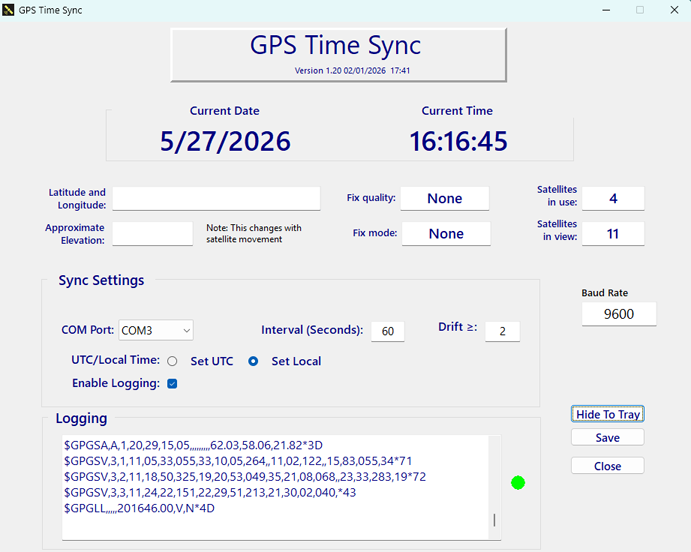
Actual GPS Time Sync 1.20 application interface showing GPS information, synchronization settings, and live NMEA data
Actual GPS Time Sync 1.20 interface
  • Windows desktop
  • VK-172 auto-detection
  • UTC or local time
NMEA inputRMC, GGA and GSV data
Smart correctionSync only when needed
Tray operationQuiet in the background
Diagnostic logsOptional troubleshooting detail

Simple by design

From satellite signal to system clock

Set it once, then let GPS Time Sync monitor the receiver and keep time in check.

01

Connect a receiver

Plug in a VK-172 USB GPS dongle. The app looks for its hardware signature and selects the matching COM port when possible.

02

Choose your limits

Select UTC or local time, set the comparison interval, and choose how much clock drift is acceptable.

03

Stay synchronized

Valid GPS time is compared with Windows. When drift reaches the threshold, the system clock is corrected and the event is logged.

From orbit to Windows

Precise GPS time for your Windows clock.

GPS satellites broadcast precise time. GPS Time Sync reads that reference through your receiver and gives you clear control over how and when Windows is corrected.

  • Automatic VK-172 detection with manual COM fallback
  • Visible receive indicator for valid NMEA sentences
  • Configurable interval and drift threshold
  • Hide-to-tray operation for everyday use
GPS satellites transmitting timing signals toward Earth
GPS satellites provide a stable global time reference

Before you begin

Built for a practical Windows GPS setup.

Operating systemMicrosoft Windows
Recommended receiverVK-172 USB GPS
Typical serial speed9600 baud
Clock changesRun as administrator
Administrator rights are required. Windows normally prevents standard applications from changing the system clock. Run GPS Time Sync as administrator when synchronization is enabled.

Ready for reliable time?

Put GPS at the center of your Windows clock.

Go to Download